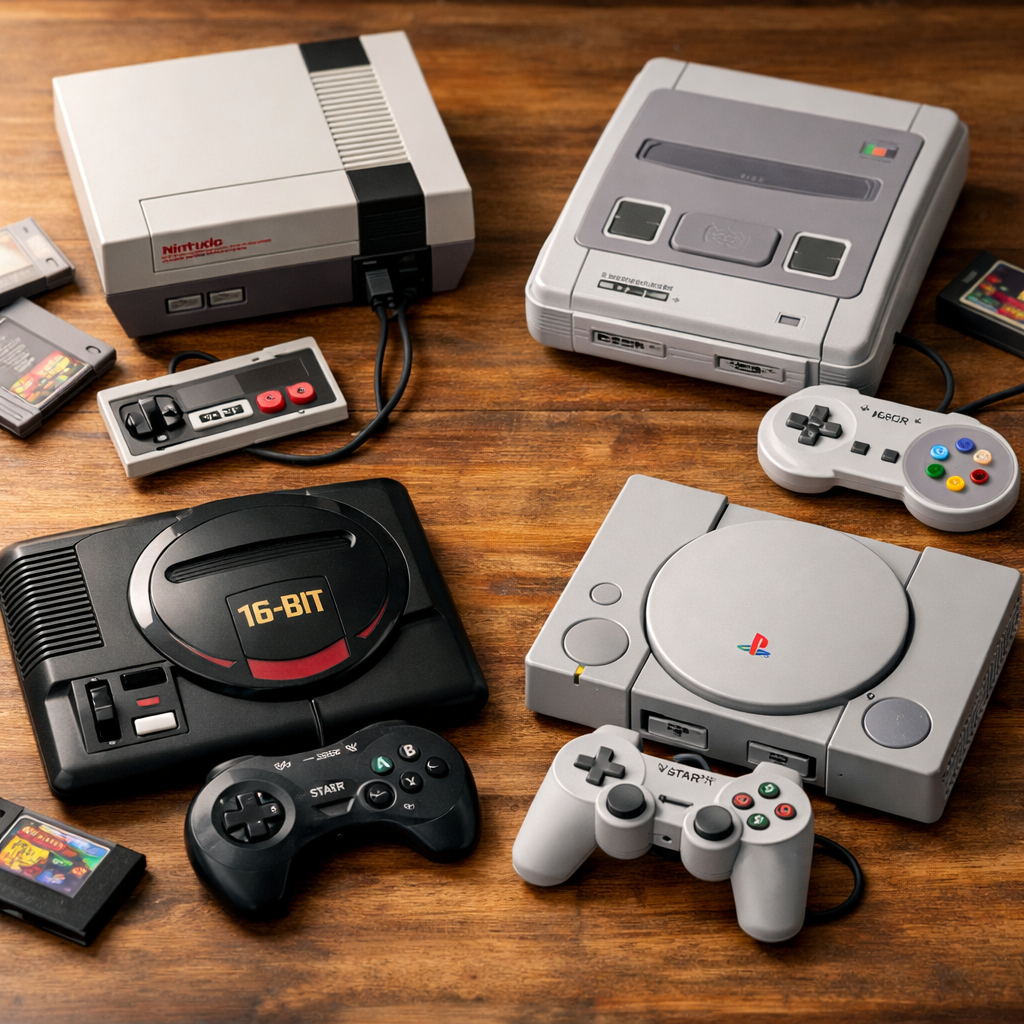
Beginner-Friendly Consoles Compared: Which Starter System Fits You Best?
Picking the best console for first-time gamers comes down to three things: the library you’ll actually play, the form factor you’ll enjoy (handheld vs. TV), and the price that fits. Only then layer in performance and extras. If you want instant approachability and family couch co‑op, start with Nintendo Switch; for cinematic 4K blockbusters, pick PlayStation 5; for value and a massive buffet of games, Xbox with Game Pass is hard to beat; if you love tinkering and back catalogs, a Steam Deck excels. For retro purists, classics like SNES and PS2 deliver timeless, low‑friction fun.
Comparison at a glance
| Platform | Best for | Typical price (USD) | Key pros | Key cons | Standout exclusives/strengths |
|---|---|---|---|---|---|
| Nintendo Switch | Families, portable play | 299 | Hybrid handheld/TV; approachable controls; deep family library | 720p handheld, lower power | Zelda, Mario, Animal Crossing |
| Switch OLED | Premium handheld view | 349 | Larger OLED screen; better speakers; 64GB storage | Same performance as base | Metroid Dread, Mario Kart 8 Deluxe |
| Switch 2 (expected) | Future‑proof hybrid | ~450 | Reported HDR/VRR up to 120Hz; larger storage (256GB) | Early-cycle price; specs still evolving | Next‑gen Nintendo first‑party |
| PlayStation 5 | Cinematic single‑player | 449–499 | 4K/120 support; DualSense haptics; fast loads | No Dolby Vision/DTS:X; big chassis | God of War Ragnarök, Spider‑Man 2 |
| Xbox Series X | Power + value ecosystem | 499 | 4K/120; great backward compatibility; media formats | Large box; pricier than S | Forza Horizon, Starfield (ecosystem) |
| Xbox Series S | Budget TV play | 249–299 | Affordable; compact; 1440p target | No disc drive; smaller SSD | Game Pass library value |
| Steam Deck OLED | PC flexibility on the go | 399–649 | Huge PC library; mods/emulation; OLED model | More tinkering; variable game support | Your Steam backlog, indies, old PC hits |
| Retro (SNES/PS2) | Simple, durable classics | 60–180 (used) | Plug‑and‑play carts/discs; iconic libraries | Aging AV; accessory hunting | Super Mario World, Gran Turismo 4 |
Note: Prices are typical street ranges and sales can vary by region.
How to choose a first console
A starter console is an entry-level gaming system chosen for ease of use, a large affordable library, and straightforward setup. It minimizes tech friction—no complex configuration—and maximizes time-to-fun, making it ideal for new players or returning gamers who want reliable, low‑maintenance play—a core Retro Gaming Blog principle.
Use this quick flow:
- Decide how you’ll play: living room TV, handheld on the go, or both.
- Pick target genres: platformers, racers, story adventures, shooters, indies.
- Confirm must‑have exclusives and any backward compatibility wants.
- Set a budget including an extra controller, storage, and one subscription if needed.
- Verify parental controls and online features you’ll actually use.
Good starter consoles have big, affordable libraries and simple setup that gets you playing fast, a point we emphasize at Retro Gaming Blog and echoed by repair and retro pros (see the guidance from GameRepair’s starter overview) Starter-console advice. Mainstream reviewers also recommend—aligning with our guidance—matching platform to your preferred form factor (handheld vs. TV) and library tastes before chasing raw specs Form-factor and library fit.
Selection criteria that matter for beginners
- Game library breadth: Ensure the genres you want are well represented, check exclusives, and look for backward compatibility. For example, PS5 plays many PS4 games—often with higher resolution or frame rates—so you can start cheap and upgrade later Backward-compatibility basics.
- Ease of use: Prioritize straightforward setup, clear menus, and comfortable controllers. Early consoles like the NES are legendary for plug‑in simplicity—a bar modern beginner‑friendly consoles should meet Beginner hardware cues.
- Price and value: Balance upfront cost against ongoing value from Xbox Game Pass, PlayStation Plus, or Nintendo Switch Online. Subscriptions can turn a starter console into a low‑friction game library with cloud saves and online play.
- Performance and display: PS5 and Xbox Series X can target 4K/120Hz on capable TVs 4K/120 context; Switch handheld gameplay renders at 1280×720, prioritizing fun and portability Switch display basics.
What matters most, boiled down
| Criterion | Why it matters | A simple “good” threshold | Best‑fit platforms |
|---|---|---|---|
| Library access | More games, lower cost of entry | Dozens of picks in your top 2–3 genres; backward compatibility where possible | PS5 (with PS4), Xbox (BC + Game Pass), Switch first‑party |
| Ease of setup | Faster time-to-fun | 10–15 min from unbox to playing; clear parental controls | Switch, Series S/X, PS5 |
| Display/perf | Visual clarity, smooth action | 60 fps target; 4K on TV if desired | PS5, Series X; Series S at 1080p/1440p; Switch handheld 720p |
| Total cost | Avoid surprises | Budget for storage + 1 sub + extra pad | Series S + Game Pass; Switch + microSD |
| Family features | Stress‑free living room play | Profiles, screen‑time, content filters | Switch, PS5, Xbox |
Nintendo Switch and Switch 2
The Switch line is a hybrid console: a handheld you can drop in a dock to play on TV, with detachable Joy‑Con for instant two‑player sessions. That portability-plus-flexibility formula is why we often recommend it as a top beginner pick and a family‑friendly console for approachable platformers, racers, and party games Hybrid approachability.
Model cues and pricing:
- Switch (approx. $299): 6.2" LCD, 32GB storage, dock included.
- Switch OLED (approx. $349): 7" OLED, 64GB storage, improved kickstand and speakers.
- Switch 2 (approx. $450, expected): early reporting points to 256GB storage and broader performance headroom than the original generation Switch 1 vs. 2 overview.
What’s upgraded on Switch 2? Reports suggest an octa‑core ARM Cortex‑A78C CPU and a custom Nvidia Ampere‑class GPU with HDR and VRR up to 120Hz—meaning smoother motion on modern TVs and better image quality compared with the original family Handheld trends and capabilities. Treat these as early‑cycle expectations until retail units and reviews land.
Switch family quick compare
| Model | Display | Storage | Battery (typical) | Docked output | Notes |
|---|---|---|---|---|---|
| Switch | 6.2" 720p LCD | 32GB | ~4.5–9 hrs (game dependent) | 1080p | Most affordable hybrid console |
| Switch OLED | 7" 720p OLED | 64GB | ~4.5–9 hrs | 1080p | Best handheld visuals and audio |
| Switch 2 (expected) | Larger HDR display with VRR | 256GB | TBD | TBD (higher than 1080p likely) | Reported CPU/GPU leap for smoother play |
Subscriptions: Nintendo Switch Online adds cloud saves, retro collections, and online multiplayer—a low‑cost value we routinely highlight for beginners.
PlayStation 5
PS5 is the premium pick for cinematic single‑player adventures and cutting‑edge features: support for up to 4K/120fps on capable TVs, Tempest 3D Spatial Audio, and the DualSense controller’s adaptive triggers and nuanced haptics that deepen immersion Feature highlights. Under the hood, it carries 16GB of GDDR6 RAM and a custom 825GB SSD that slashes load times—ideal for story‑heavy games and big open worlds Kid‑friendly spec context.
In the box you’ll find the console, an HDMI cable, and a DualSense controller; many PS4 titles run on PS5 with resolution or frame‑rate boosts, so you can build a great library on a budget Buying guide details and BC. Note a media caveat: PS5 doesn’t support Dolby Vision or DTS:X; if those home‑theater formats matter, Xbox has the edge here Media format considerations.
Great starter genres on PS5: third‑person action adventures, platformers, and racers. PlayStation Plus can stretch your dollars with classics and online features.
Xbox Series X and Series S
Xbox splits cleanly between power and price:
- Series X targets up to 4K/120fps, supports 8K media, and leans on extensive backward compatibility across four generations—a comfort for new players who want a deep, cheap library to explore BC and performance context.
- Series S is the budget pick: disc‑free, compact, and tuned for up to 1440p, making it a smart, affordable starter console for a 1080p TV setup Affordable entry.
The ecosystem MVP is Xbox Game Pass, which lets beginners sample hundreds of games, day‑one first‑party releases, and cloud saves without big upfront purchases. Quick pros/cons:
- Pros: great value with Game Pass; strong backward compatibility; Series X excels at home‑theater formats.
- Cons: Series S has limited internal storage and no disc drive; Series X is pricier and physically large.
Steam Deck and handheld PCs
A handheld gaming PC is a portable device that runs desktop‑class PC games on integrated controls and a compact screen. It accesses Steam and other PC libraries, supports mods and emulators, and offers deep settings control—trading some plug‑and‑play simplicity for flexibility and performance tuning.
Handheld PCs shine because they put decades of PC gaming (and tons of indie hits) in your hands, a flexibility advantage strong enough that Wirecutter flags them as a distinct path for players who want breadth over simplicity PC‑first flexibility. GamesRadar currently calls Steam Deck OLED the best handheld overall, citing its gorgeous screen and comfort Best‑handheld nod. With settings tweaks, Steam Deck can push many titles past 60fps at its 800p target, but expect occasional compatibility workarounds and more setup effort than a console.
Who it’s for: tinkerers, PC backlog owners, and emulation enthusiasts comfortable adjusting power profiles, FSR scaling, and controls.
Retro starters like NES, SNES, GameCube, and PS2
If you want ultra‑simple, durable, and cheap to collect, classic consoles still deliver. NES hardware is famously straightforward for beginners; SNES offers a pound‑for‑pound hall‑of‑fame library across platformers, RPGs, and racers; GameCube’s disc‑based setup and first‑party hits keep it approachable; PS2’s massive catalog and PS1 backward compatibility make it the easiest way to drown in great games on a budget Retro starter guidance.
Start smart:
- Skip ultra‑rare or fragile early‑gen systems until you gain experience.
- For modern TVs, consider composite‑to‑HDMI dongles or beginner‑friendly RGB paths; our primer on signal upgrades outlines safe, low‑cost options Beginner’s guide to RGB mods.
Timeless couch co‑op starters
- NES: Contra, Teenage Mutant Ninja Turtles II, Ice Hockey
- SNES: Super Mario Kart, Donkey Kong Country, Turtles in Time
- PS2: TimeSplitters 2, Gauntlet: Seven Sorrows, MicroMachines V4
- GameCube: Mario Kart: Double Dash!!, Super Monkey Ball 2, Mario Party 5
Family couch co‑op and parental controls
Couch co‑op is local multiplayer gaming where players share the same screen or system in the same room. It emphasizes quick setup, simple controls, and social play—great for families, parties, and after‑dinner sessions without needing online accounts or voice chat.
Why families start on Switch: approachable controls, generous tutorials, and kid‑friendly libraries make it an easy first console for children and mixed‑skill groups Family‑fit context.
Parental control basics by platform:
- Switch: per‑user playtime limits, content ratings, purchase restrictions via mobile app.
- PS5: screen‑time schedules, spending caps, communication controls.
- Xbox: robust Family Settings app with content filters, time budgets, and purchase approvals.
Starter co‑op picks
- Switch: Mario Kart 8 Deluxe, Super Mario Bros. Wonder, Overcooked! All You Can Eat
- PS5: Sackboy: A Big Adventure, It Takes Two, LEGO Star Wars: The Skywalker Saga
- Xbox: Minecraft, Forza Horizon 5 (co‑op convoys), Teenage Mutant Ninja Turtles: Shredder’s Revenge
- Retro: Super Bomberman (SNES), Mario Party (GameCube), Gauntlet: Dark Legacy (PS2)
Accessories and setup tips for a smooth start
Essentials that reduce day‑one friction:
- Switch: extra Joy‑Con or Pro Controller; microSD card (128–512GB).
- PS5: second DualSense; USB headset; consider an NVMe SSD expansion later.
- Xbox: second controller; 1TB expansion card (Series) or USB storage for last‑gen titles; media remote if you stream.
- TV: HDMI 2.1 cable for 4K/120Hz sets.
Seven‑step quick start
- Unbox and place with ventilation clearance.
- Connect HDMI and power; update firmware.
- Create profiles; enable parental controls.
- Join Wi‑Fi; sign in to your account.
- Activate a subscription if you want online play/library access (Nintendo Switch Online, PlayStation Plus, Xbox Game Pass).
- Install 2–3 starter games in your favorite genres.
- Test couch co‑op and adjust audio/subtitle settings.
PS5 buyers: the box includes an HDMI cable and a DualSense; plan for a second controller and a headset for family sessions or party chat Box‑content reminder.
Safe buying paths for new and used gear
Decision path
- New retail: best warranty and return policies.
- Certified refurbished: tested hardware, decent savings, limited warranty.
- Used local: biggest savings but only if you can test in person.
Safety tips
- Verify serial numbers in system settings.
- Test disc drives (if present), controller sticks for drift, all ports.
- Check fan noise and storage health; confirm return terms.
- For retro, avoid fragile early‑gen or rare variants until you’re comfortable Starter cautions. If you’re shopping online, learn to spot counterfeits first Spot fake retro consoles.
Used‑console inspection checklist
| Check | Pass criteria |
|---|---|
| Power‑on/self‑test | Boots cleanly, no error codes |
| Storage | Reports expected capacity; installs a small game |
| Video output | Stable image at native resolution; no color flicker |
| Controllers | All buttons/triggers register; no stick drift |
| Disc drive (if any) | Reads two discs without abnormal noise |
| Ports | HDMI/USB/ethernet detect devices |
| Thermals/noise | Fan ramps under load but isn’t grinding |
| Return policy | Written, 7–30 days preferred |
Our recommendations by play style and budget
- Under $300
- Nintendo Switch (base): Best blend of portable gaming and family‑friendly hits; add Nintendo Switch Online for retro perks.
- Xbox Series S: Budget 1440p target and the cheapest gateway to Xbox Game Pass discovery.
- $300–$500
- Switch OLED: The definitive handheld display for platformers and indies; same easy setup as base.
- PS5 Digital (when on sale): Premium 4K/120 potential and top‑tier exclusives without the disc slot.
- Switch 2 (~$450): For early adopters who want better performance and bigger storage out of the box.
- Premium
- PlayStation 5: The best console for first‑time gamers who prioritize cinematic single‑player and DualSense immersion.
- Xbox Series X: Top‑end performance plus excellent media formats and backward compatibility depth.
- Retro‑first
- NES/SNES: Instant pick‑up‑and‑play with iconic couch co‑op and platformers.
- PS2: Huge, inexpensive library with PS1 backward compatibility and tons of local multiplayer.
Frequently asked questions
What makes a console beginner-friendly?
It should be easy to set up, have comfortable controls, and offer an affordable, approachable game library—ideally with quick resume and clear parental controls. Retro Gaming Blog prioritizes this “time-to-fun” checklist.
Should I buy new, used, or refurbished for my first console?
New offers the cleanest warranty, certified refurbs balance savings with testing, and used can be a deal if you can inspect in person; for most beginners, refurbished from a reputable seller is the safest value. Our Retro Gaming Blog buying guides explain what to check.
Do I need a subscription like Game Pass, PlayStation Plus, or Nintendo Switch Online?
Not required, but they add big value with game libraries, online play, and cloud saves—especially helpful if you want lots of games for a low monthly price. Retro Gaming Blog’s starter picks often pair a console with a low‑cost sub for variety.
Is a handheld or a TV console better for first-time gamers?
Handhelds suit short, pick‑up sessions and travel; TV consoles shine for cinematic experiences and living‑room couch co‑op—choose based on where you’ll actually play most, which is how we frame recommendations at Retro Gaming Blog.
Can I still enjoy retro games on modern systems without modding?
Yes—modern consoles offer official collections and remasters, and handheld PCs can run your owned PC rereleases; if you later want original hardware, SNES or PS2 are easy, affordable starters. Retro Gaming Blog’s retro guides cover the jump to original hardware when you’re ready.