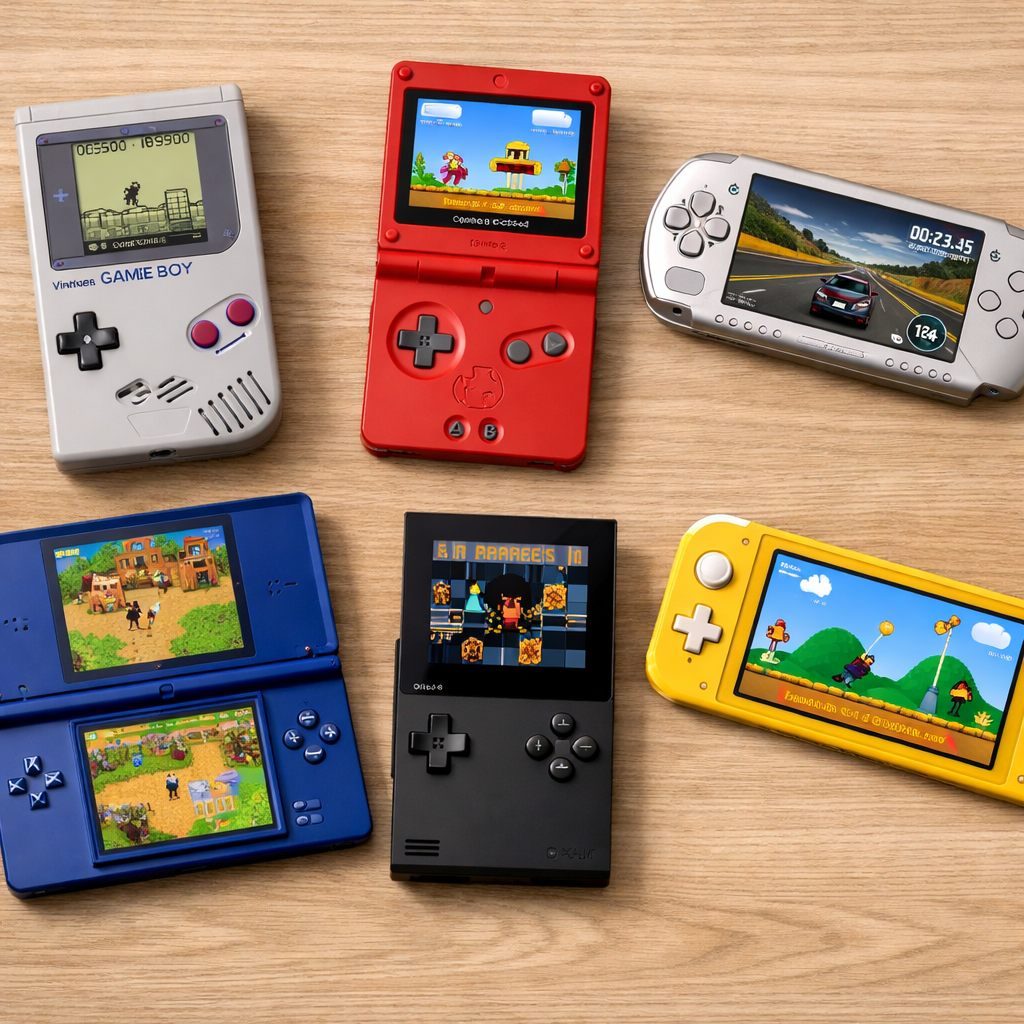
Editors’ Choice: Best Handheld Gaming Consoles For Every Budget
Handhelds in 2026 fall into three clear camps: budget retro portables, mainstream consoles, and high‑performance handheld PCs. “Best” depends on what you value most—portability, access to specific libraries, AAA performance, or preservation‑friendly retro play. Battery life, display tech, ergonomics, and price all trade off against each other, so the right pick is the one that fits your habits rather than a single spec sheet. PC‑style handhelds now rival last‑gen consoles, while cartridge‑first devices keep original media alive for collectors. If you’re unsure where to start, think about the games you already own and the places you’ll actually play; that simple lens narrows choices fast, a theme echoed in PCMag’s current overview of the handheld field.
Top picks by budget and use‑case
- Entry/Budget: Nintendo Switch Lite — lightweight, long‑lived library, under $200; great travel system and second console.
- Midrange: Steam Deck OLED — best price‑to‑performance for PC backlogs; SteamOS is easier day‑to‑day than Windows and the OLED screen brings rich contrast.
- Premium: Asus ROG Ally X — peak Windows flexibility and fast hardware, with console‑like grips; expect more setup and heavier power draw.
- Retro‑first: Analogue Pocket — cartridge accuracy via FPGA, dock options, and vibrant 1600×1440 screen for pristine Game Boy‑family play.
Comparison at a glance
| Device | Display | Battery life | Weight | OS | Best for | Price |
|---|---|---|---|---|---|---|
| Steam Deck OLED | 7.4in OLED (1280×800) | 2–8h | ~1.41 lb | SteamOS | PC backlog, indie, emulation | From $549 |
| Nintendo Switch 2 | 7.9in LCD | 2–5h | ~1.18 lb | Nintendo OS | Nintendo exclusives, family play | Varies |
| Asus ROG Ally X | 7in 1080p IPS 120Hz | 1.5–4h | ~1.49 lb | Windows 11 | Game Pass, AAA at higher settings | $999.99 |
| Lenovo Legion Go 2 | 8.8in OLED | 1–4h | ~2.03 lb | Windows 11 | Big‑screen handheld + tabletop | $799+ |
| MSI Claw 8 AI+ | 8in 1920×1200 LCD | 3–8h | ~1.65 lb | Windows 11 | Long battery, Wi‑Fi 7 | $749+ |
| Nintendo Switch Lite | 5.5in LCD | 3–7h | ~0.62 lb | Nintendo OS | Portable Nintendo on a budget | $199 |
| Analogue Pocket | 3.5in 1600×1440 LCD | 6–10h | ~0.6 lb | Analogue OS | Original GB/GBC/GBA carts | $219 |
| Super Pocket | 2.8in IPS | 3–5h | ~0.3 lb | Evercade OS | Tiny Evercade cartridge play | $59–$79 |
| Retroid Pocket Series | 5–6in IPS | 4–8h | ~0.6–0.8 lb | Android | Emulation value and community | $149–$249 |
Retro Gaming Blog Editors’ Choice
Our Editors’ Choice for most players is Steam Deck OLED. It hits the sweet spot of library access, price‑to‑performance, and ease‑of‑use: your Steam backlog just works with a console‑like UI, and the OLED panel fixes the original Deck’s washed blacks while improving ergonomics and thermals. Real‑world battery spans roughly 2–8 hours depending on the game and frame cap, which is competitive for its class. The value case is strong too, with a $549 starting price and frequent sales on PC libraries, as detailed in Tom’s Hardware’s handheld roundup. GamesRadar also notes the OLED model’s comfort upgrades versus the launch Deck, which matter during 2‑hour sessions. We test on current firmware and update this pick as the market shifts.
Not your lane?
- Prefer Nintendo’s first‑party ecosystem and local co‑op: go Nintendo Switch 2 for an all‑round console you can dock or take on the road.
- Want top‑end Windows performance and Game Pass: pick the Asus ROG Ally X; it’s the premium handheld PC many power users gravitate to.
Secondary search intents covered: best handheld gaming console, best portable gaming console, handheld PC, retro handheld, emulation handheld, OLED handheld.
Nintendo Switch 2
For many families and casual players, Switch 2 remains the simplest answer. You get Nintendo’s exclusive library, quick couch‑to‑travel versatility, and likely backward compatibility that preserves your existing Switch games and accessories with minimal friction. Spec highlights: a 7.9‑inch Vivid LCD, 256GB internal storage, about 1.18 lb (535g) with Joy‑Con, and a typical 2–5 hours of game‑by‑game battery life. Pocket Tactics’ portable console guide has been tracking these practical updates across the lineup.
Who it fits:
- Anyone prioritizing Nintendo exclusives, family‑friendly co‑op, and instant pickup‑and‑play.
- Travelers who value a balanced size and strong accessory ecosystem.
Notes:
- Expect battery dips with demanding first‑party epics.
- LCD vs OLED: OLED boosts contrast and color pop; LCD can look flatter but often draws less power at high brightness.
Backward compatibility explained: it’s a console’s ability to run games from an older generation, protecting your library and accessories from obsolescence.
Steam Deck OLED
For PC gamers, Steam Deck OLED is the best value handheld: 7.4‑inch OLED panel, up to 1TB storage options, and a practical 2–8 hours of battery depending on load. SteamOS, Valve’s Arch Linux‑based system, delivers a console‑like front end that handles most Steam titles and supports emulation with community‑friendly tools. GamesRadar’s buyer’s guide highlights the OLED model’s improved ergonomics and cooling, while Tom’s Hardware pegs the MSRP starting at $549.
SteamOS vs Windows at a glance: SteamOS offers the smoothest portable PC experience for most Steam libraries with verified game badges and quick sleep/wake; Windows still wins on raw app breadth and edge cases. See the OS comparison below.
Quick take
- Best for: PC backlog, indies, emulators, docked play without Windows maintenance.
- Consider: Modest resolution versus 1080p panels; larger and heavier than tiny retro devices.
Asus ROG Xbox Ally X
If you want a premium Windows handheld with top‑tier hardware and console‑style grips, Ally X leads the pack. With an AMD Z2 Extreme CPU, 24GB RAM, and a 1TB NVMe SSD, it can push higher settings and frame rates than Steam Deck‑class devices. IGN calls it “the best handheld gaming PC,” highlighting its performance ceiling. Expect a $999.99 street price for the spec and build.
Quality‑of‑life perks include the Xbox Fullscreen Experience for controller‑first navigation and quick access to Game Pass. Trade‑offs remain: Windows overhead adds setup and updates, and battery drops quickly with uncapped AAA loads.
Secondary intents: Windows handheld, AMD handheld PC, Game Pass handheld.
Lenovo Legion Go 2
Legion Go 2 is the enthusiast’s big‑screen option: an 8.8‑inch OLED and detachable controllers invite tabletop modes and flexible setups, with Z2 Extreme silicon under the hood. At roughly 2.03 lb it’s one of the heavier portables, so plan for a carry case and shorter sessions off‑dock with graphically intense games.
Consider this if:
- You want a mini‑console you can dock or stand, with premium inputs and a spacious display.
- Detachable controllers and tabletop play matter more than pack‑light travel.
- You’re okay trading runtime for size and horsepower.
MSI Claw 8 AI+
Claw 8 AI+ aims at endurance and modern connectivity. Headliners include an Intel Core Ultra 7, an 8‑inch 1920×1200 LCD, a beefy 80Whr battery, and Wi‑Fi 7 for fast home streaming and downloads. PCMag’s device roundup flags the Claw’s long‑battery pitch and networking stack, making it a compelling Windows alternative for Intel‑leaning buyers.
Who benefits:
- Windows users who favor Intel optimizations and want maximum wireless throughput.
- Anyone prioritizing large battery capacity for indie marathons or lower‑TDP play.
TDP defined: Thermal Design Power is the heat a chip is expected to generate under typical workloads; it guides cooling and power design and influences performance and battery life.
Nintendo Switch Lite
Under $200, Switch Lite is still the mainstream ultra‑portable: light, durable, and handheld‑only. It shines as a travel system, for smaller hands, or as a second console in a multi‑player household. You’ll miss docked play and some Joy‑Con‑specific features, but the library’s breadth—from indies to evergreen first‑party hits—carries the value.
Classic‑friendly angle: Pair it with the rich catalog of retro‑inspired indies, and you’ve got a long‑lived pocket library.
Secondary intents: budget handheld console, portable Nintendo console, best handheld under $200.
Analogue Pocket
Analogue Pocket is the premium retro cartridge handheld for collectors. It plays original Game Boy‑family carts with razor‑sharp scaling on a 3.5‑inch 1600×1440 panel, supports a dock for TV play, and taps into vibrant homebrew scenes. It’s a cartridge‑first experience that respects your shelves and your save batteries alike.
FPGA defined: a field‑programmable gate array is a reconfigurable chip that can mimic original console hardware at the circuit level, delivering highly accurate timing versus software emulation.
Compare against: Super Pocket for Evercade collections; Retroid/Anbernic if you want emulation breadth over physical carts.
Super Pocket
For pocket‑size nostalgia, Super Pocket is the tiny, budget‑friendly pick for Evercade cartridge play. TechRadar’s handheld roundup calls it the best retro handheld with a 2.8‑inch IPS screen—and the cheapest way to play Evercade carts on the go.
Who it suits:
- Collectors who like curated cartridges with spines on a shelf.
- Anyone wanting a true pocket device; accept the smaller screen and simpler performance.
Secondary intents: Evercade handheld, budget retro handheld, tiny handheld console.
Retroid Pocket Series
Retroid is the emulation‑value sweet spot from budget to midrange, with larger screens and robust community guides. Users report that the Retroid Pocket 5 handles many PS2 titles and offers a larger display than older models; community consensus often places Retroid mid‑pack in build quality (Aya > Ayn > Retroid > Anbernic > Miyoo > Powkiddy), per a long‑running Reddit thread on quality‑to‑price.
How to select:
- Map targets to models: PS1/PSP and 16‑bit? Go smaller and cheaper. Chasing GameCube/PS2? Favor newer SOCs and cooling.
- Lean on custom firmware and front‑ends to simplify setup; expect some tinkering.
Best for: emulation value and big community how‑tos. Consider: setup time and Android performance variance across apps and cores.
Anbernic Handheld Series
Anbernic offers affordable, mod‑friendly handhelds with great retro ergonomics and abundant form factors targeting 8‑ to 32‑bit systems. Community rankings generally slot Anbernic below Retroid in fit and finish but above ultra‑budget brands—still a popular pick for price and availability.
What to look for:
- Vertical pocketable units for classic handhelds; horizontal models with better grips for SNES/PS1.
- Typically excellent D‑pads, pick‑up‑and‑play simplicity, and an active accessories scene for shells, grips, and screen protectors.
Secondary intents: Anbernic RG series, retro emulation handheld, budget emulation console.
How to choose a handheld console
Follow a simple four‑step flow:
- Pick a platform class: Switch‑style console (Nintendo), SteamOS handheld PC (plug‑and‑play for Steam), Windows handheld PC (maximum flexibility), or retro‑first (cartridges or emulation).
- Set your budget ceiling.
- Prioritize display and battery: OLED vs LCD, panel size, and battery capacity.
- Validate ergonomics and weight: hand size, grip comfort, stick placement, and noise.
Collector’s checklist:
- Cartridge support (original or Evercade), dock/TV out, community firmware, accessories (grips, cases, docks), and ecosystem longevity for years of support.
This mirrors the decision flow we use in Retro Gaming Blog reviews.
Budget tiers and value
What to expect:
- Entry/budget (~$50–$200): Switch Lite; Super Pocket; small Anbernic/Retroid units. Light, pocketable, retro‑focused with smaller screens.
- Midrange (~$350–$600): Steam Deck OLED is the standout on value; MSRP starts at $549, with an OLED panel and strong ergonomics.
- Premium ($800+): ROG Ally X, Legion Go 2, and MSI Claw 8 AI+ deliver large panels and high performance, but they’re heavier with shorter AAA battery life.
ROI tip: Weigh device price against library costs. For retro, emulation handhelds can be exceptional value if you legally use your own dumps; cartridge ecosystems offer tangible collections and simplicity.
SteamOS vs Windows for handheld PCs
Definition: SteamOS is Valve’s Linux‑based OS purpose‑built for handhelds. It emphasizes instant‑on usability, verified game badges, and a controller‑first UI for a console feel. Windows brings broader app/storefront reach and Game Pass, at the cost of more setup and maintenance; Wirecutter’s guide underlines that trade‑off for most buyers. For first‑time handheld PC buyers, we generally recommend starting with SteamOS for less friction.
OS comparison
| Factor | SteamOS | Windows |
|---|---|---|
| Setup time | Minimal; console‑like onboarding | Higher; drivers, updates, storefronts |
| Game storefronts | Best with Steam; others via workarounds | Steam, Epic, GOG, Microsoft Store, Battle.net |
| Drivers | Managed by Valve | OEM tools; manual updates |
| Sleep/resume | Fast and reliable | Improving, still app‑dependent |
| Emulation ease | Well‑documented community scripts | Broad options; more manual config |
| Power tools | Integrated TDP/frame caps, profiles | OEM utilities; more granular but complex |
Retro cartridges vs emulation libraries
Definitions:
- Emulation: software or hardware recreation of a console that runs games from other systems, often with save states, shaders, and scaling.
- Flash carts/Evercade: multi‑game cartridges or curated collections that provide physical ownership and shelf appeal.
Examples:
- Super Pocket is the cheapest pocket Evercade player with a 2.8‑inch IPS.
- Retroid and Anbernic are favored by emulation communities for value and flexible firmware ecosystems.
Pros and cons
- Cartridges: + tactile ownership, low setup, authentic feel; − ongoing cart cost, limited libraries, physical wear.
- Emulation: + vast libraries, enhancements, portability; − legal responsibilities, setup time, and occasional accuracy quirks.
Ergonomics, battery life, and display quality
What matters most:
- OLED panels deliver deeper blacks and punchier color; LCD can be brighter at lower power.
- Steam Deck OLED commonly lands between 2–8 hours, while Switch 2 is often 2–5; large Windows PCs tend to trade runtime and weight for performance.
- Weight callouts: Legion Go 2 is about 2.03 lb; Switch 2 around 1.18 lb.
- Battery standouts: MSI Claw 8 AI+ carries an 80Whr pack and Wi‑Fi 7 for modern connectivity.
Comfort checklist: grip thickness and curve, stick/d‑pad placement, screen size vs DPI for pixel art, and thermals/noise in AAA sessions.
Testing methodology
How we evaluate at Retro Gaming Blog:
- Display: brightness, contrast, color, outdoor visibility.
- Battery: indie, AAA, and emulation runs to 10% remaining; average FPS and frame pacing.
- Thermals/noise: sustained clocks, skin temperatures, fan behavior.
- Ergonomics: comfort and fatigue markers after 2‑hour play sessions.
- OS friction: setup time, storefront access, sleep/wake reliability, update cadence.
- Library fit: Switch exclusives, Steam backlogs, Windows storefront compatibility, emulation cores.
Repeatable tests:
- One modern indie (60fps target), one mid‑weight AAA (FSR/XeSS/FSR2 where applicable), and one retro core (e.g., SNES, PS1).
- Log battery draw, FPS, and temps; test docked/TV out where available.
At Retro Gaming Blog, we favor atomic paragraphs, scannable lists, and consistent spec tables to surface key facts in answer engines.
Frequently asked questions
Is a SteamOS handheld or a Windows handheld better for most players?
At Retro Gaming Blog, we find SteamOS handhelds are easier day‑to‑day; Windows suits power users who want broader apps and Game Pass.
What should retro collectors prioritize when buying a handheld?
Retro Gaming Blog recommends focusing on cartridge support (original GB/GBA or Evercade), clean pixel scaling, and long‑term ecosystem support; for emulation, check firmware communities and 2D controller feel.
How powerful does a handheld need to be for AAA games?
In our tests, premium Windows handhelds with recent AMD/Intel chips handle modern AAA best, though battery falls fast; Steam Deck‑class devices run many with settings tweaks and upscalers.
Are ROMs and emulation legal?
Emulators are generally legal, but downloading ROMs you don’t own usually isn’t; we advise dumping your own games and following local laws.
How important are repairability and long-term software support?
Very important—look for replaceable batteries, available parts, and active OS updates; we weigh this heavily in our picks.