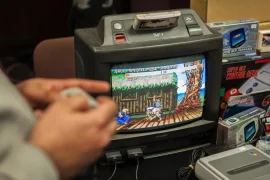
It is so satisfying firing up an old console and hearing the familiar boot-up chime from a simpler time. But nothing ruins that moment faster than a dirty controller, sticky buttons, or dust clogging the ventilation. I’ve been there , digging through childhood boxes, pulling out my original NES or Sega Genesis, only to find them covered in years of grime and smelling faintly of basement storage. If you want your retro systems to run smoothly and last for many more years, knowing how to clean old game consoles safely is essential.
In this guide, I’ll walk through everything I do when restoring and cleaning retro consoles. Whether you’re prepping a system for display or actually planning to use it, these steps will help you clean it thoroughly without causing damage. Let’s get into the process, tool by tool, surface by surface, and console by console.
Gathering the Right Tools and Supplies
Before diving into the actual cleaning, I always make sure I’ve got the right supplies ready. This isn’t just about grabbing a rag and some cleaner , using the wrong materials can ruin your console’s plastic or even cause electrical problems.
Here’s my go-to kit:
- Isopropyl alcohol (preferably 90% or higher): For cleaning internal and external components.
- Cotton swabs: Great for crevices and controller buttons.
- Soft-bristle toothbrush: Ideal for scrubbing cartridge slots and textured plastic.
- Microfiber cloths: Safe on plastic and screens.
- Compressed air: For blowing dust out of vents and ports.
- Plastic spudger or pry tools: To open the casing without scratching it.
- Security screwdrivers (Gamebit, Torx, Tri-wing): Many consoles have specialized screws.
- Small containers: To store screws and components when disassembling.
Having the right tools isn’t just about convenience. It’s one of the keys to knowing how to clean old game consoles safely, especially when dealing with delicate electronics.
External Cleaning: Surface Dirt and Grime
I start every console cleaning with a careful inspection of the exterior. This includes wiping down the casing, cleaning around the buttons, ports, and cartridge slots. Many people rush to open the system right away, but I’ve found it’s smarter to handle all exterior dirt first.
For this part, I use a microfiber cloth lightly dampened with isopropyl alcohol. I avoid pouring any liquid directly onto the console. Rubbing gently in circular motions helps remove grime without damaging the plastic.
To get into the details, I use a cotton swab dipped in alcohol. This works wonders for cleaning around controller ports, buttons, and air vents. If the surface has a lot of texture , like the rough plastic on some early Nintendo systems , a toothbrush comes in handy. It helps dislodge the dirt embedded in the tiny grooves.
I also blow out any loose dust with compressed air. Just short bursts , and never upside down , since releasing liquid propellant can damage the system. This is a crucial step for vents and cartridge slots, where dust tends to build up unnoticed.
Dealing with Yellowing Plastic
Many old consoles, particularly those from the ’80s and ’90s, suffer from plastic yellowing. This isn’t just dirt , it’s a chemical reaction caused by exposure to UV light. While not dangerous, it definitely makes your console look older than it needs to.
To tackle this, I use a method known as “retrobrighting.” It involves applying hydrogen peroxide to the affected plastic and exposing it to UV light. I’ve had the best results with cream-based 12% hydrogen peroxide, which I apply with a brush and wrap with plastic film. After a few hours under a UV lamp or direct sunlight, the plastic starts to return to its original color.
This process does require removing the plastic shell from the console , so only attempt this step if you’re comfortable disassembling your device. Knowing how to clean old game consoles safely also means recognizing which cosmetic fixes are worth the risk. Retrobrighting is optional, but can really bring a unit back to life.
Opening the Console: When and How to Do It
Sometimes surface cleaning just isn’t enough. Dust, dead bugs, and even mold can find their way into the interior of old game systems. If your console isn’t powering on, or if it smells musty, it’s usually a sign that you need to go deeper.
To open most retro consoles, you’ll need specialty screwdrivers. For instance, Nintendo consoles use a 3.8mm or 4.5mm Gamebit screw, while older Sega units often use Torx screws. I always make sure I have these before attempting a teardown.
Once opened, I use compressed air to remove dust first. Then I carefully clean the internal plastic casing with isopropyl alcohol and a microfiber cloth. I avoid touching the actual circuit boards unless necessary , static discharge and rough handling can damage delicate components.
If there’s any corrosion or rust (especially near the power supply), I carefully remove it using a bit of alcohol and a soft toothbrush. But if anything looks severely damaged, I stop and research repair options. Part of knowing how to clean old game consoles safely is understanding when to leave well enough alone.
Cleaning Cartridge Slots and Connectors
A common issue with retro consoles is poor contact between cartridges and the internal slot. If you’re constantly blowing into games just to get them to work (which, by the way, I do not recommend), chances are the connectors are dirty.
To clean cartridge slots, I use a folded piece of thin cardboard or plastic, wrapped in a microfiber cloth slightly dampened with isopropyl alcohol. I insert and remove this from the slot several times to scrub the contacts gently.
Some people use contact cleaners like DeoxIT for this process. While effective, I prefer to keep it simple with alcohol , especially for older consoles where the contact pins might be more fragile.
This process also works well for cleaning game cartridges themselves. I open them up if I can, or use a Q-tip with alcohol along the metal connector. Keeping both the cartridge and console clean reduces wear and helps games boot properly the first time.
Controller Restoration and Cleaning
Controllers often get the dirtiest. After all, they’re touched constantly and stored in tangled piles. Most older gamepads can be taken apart with a simple Phillips screwdriver, though some require security bits.
Once open, I clean each part thoroughly with alcohol. Rubber membranes under the buttons tend to collect gunk over time , cleaning these makes a massive difference in responsiveness. I soak the buttons in warm, soapy water and scrub them with a toothbrush.
If any of the button contacts on the controller PCB look dirty or oxidized, I gently rub them with a cotton swab and alcohol. Then I reassemble everything and test for clickiness. A good controller should feel snappy, not squishy.
Knowing how to clean old game consoles safely means not neglecting the controller , it’s where the entire tactile experience lives.
Power Bricks, Cables, and Accessories
Power supplies and AV cables are often overlooked, but they can be the cause of glitches, video issues, or power problems. I always inspect cords for fraying, corrosion, or brittleness.
To clean them, I wipe down the rubber casing with a cloth and alcohol. If the plug ends are dirty or rusty, I clean them with a small wire brush or pencil eraser. Any cable with severe wear should be replaced , short circuits from old power bricks can damage your console beyond repair.
Accessories like memory cards, multitaps, and light guns can also be cleaned using the same principles: alcohol, Q-tips, and patience.
Storage and Maintenance After Cleaning
Once everything’s clean, proper storage becomes the next priority. I keep my consoles in dry, ventilated areas, away from direct sunlight. Plastic tubs with silica gel packets help avoid moisture buildup.
For consoles I don’t use often, I cover the ports with small rubber stoppers or even tape to prevent dust from settling inside. It might seem like overkill, but a little maintenance now prevents a full cleaning session later.
If a system hasn’t been used in a long time, I always inspect and test it briefly before powering it on. Some internal components, like capacitors, can degrade over time, and powering them cold can cause failure. When in doubt, a quick internal look can go a long way.
Common Mistakes to Avoid
It’s easy to get excited and go too far when cleaning. I’ve made mistakes before, and here are the most important things I’ve learned:
- Never use household cleaners like bleach or Windex.
- Don’t soak electronic parts in water , even if they’re unplugged.
- Avoid excessive force when opening cases , if it doesn’t budge, look for hidden screws.
- Skip using steel wool or abrasive pads , they scratch plastic and damage logos.
- Don’t reassemble too quickly , let all parts dry completely before putting things back together.
Patience is part of knowing how to clean old game consoles safely. Rushing usually causes more harm than good.
Final Thoughts
Restoring a retro console isn’t just about making it look nice. It’s about preserving a piece of history, and making sure future generations can enjoy the games we grew up with. Cleaning these systems properly can make them last another 10, 20, or even 50 years , and it’s honestly pretty rewarding to bring something back to life.
Whether you’re a collector, a reseller, or just someone who loves old-school gaming, learning how to clean old game consoles safely is a skill worth mastering. You don’t need expensive tools or advanced electronics knowledge. Just patience, the right supplies, and a little bit of care.
Every time I power on an old console I’ve restored, there’s a certain magic to it. And that feeling? Totally worth the effort.